
With the recent launch of Google’s Gemini 3 Pro, the playground of LLMs is once again shacking. By the benchmarks, the newest Gemini 3 Pro outperforms other LLMs such as ChatGPT or Grok in most of the evaluations. With the brand new development IDE, Antigravity, Google launched pretty much at the same time, I see the confidence Google has in their play in LLM.
I had access to Gemini Pro for a while because it comes with my university account, but because it was relatively less reliable compared to other LLMs available, I’ve been using a paid version of ChatGPT then switched to Grok 4, another paid LLM by xAI. With all the excitement I see around the new Gemini 3 Pro, however, I’m once again thinking about switching. As part of my decision-making process, I’m wished to test both out beyond the benchmarks with the real usages I have in my research in the field of Robotics (mainly for implementing of research ideas into programs).

Table of Contents
Usage in Robotics: Find logical errors in a work-in-progress program
Of all benefits of LLMs, I use them the most for improving a program I drafted. Since I use C++ in implementing pretty much anything that does search, the compiler will catch syntax errors even before I run it. However, finding even tiny logical errors, from a typo in numbers to various error in high-level structure, has been known to be very hard to pin-point unless a developer does. I’ll test the two LLMs with a path planning algorithm with a small error and a room for improvement and let them figure out the problems.
Testbed: Multi-Agent Path Planner with kinematic constraints
Recently, I’ve been working on implementing a Multi-Agent Path Finder(MAPF). There are some planners shared online, but because of additional constraints in the problem I’m studying, mainly the steering limit of each robot and multiple paths in series, I had to make my own. Below is the Github repository with the most up-to-date version I’m sharing to public.

Problem 1: Planned path not visualized
One problem I faced was that even with all paths successfully found, the visualizer misses out the second path I planned for one of the robot as shown below.

You can the path is correctly planned by looking at the path trace, but the animation of the robot stops before it completes the travel. I think I know why it happens and how to fix it myself (probably because I didn’t assign timestamps correctly), but I saved it for testing the two LLMs.
For both LLMs, I have prepared a prompt that will be thrown at along with the source code.
I’m implementing a multi-agent path finder. The current planner successfully finds all requested paths, but the visualizer called after the planning process does not show the movement of the robot for the path comes after its first path until the time scroll reaches the end. The source code files are attached.
Gemini 3 Pro Answer
I didn’t count the time, but it took not much longer than a minute for Gemini 3 Pro to give its answer. The verdict of Gemini 3 Pro is there is a problem in time slider range:
The issue lies in how the maximum time for the simulation slider is calculated in Visualization.h.Gemini 3 Pro then provided a solution to fix it as below. Basically, it is telling me to increase the range of the time scroll.
// Find this section in show_results
double max_t = 0.0;
for (const auto& traj : all_trajectories) {
    if (!traj.waypoints.empty()) {
        // OLD CODE: Incorrectly uses relative time
        // max_t = std::max(max_t, traj.waypoints.back().time);

        // NEW CODE: Correctly adds the trajectory start offset
        max_t = std::max(max_t, traj.start_time + traj.waypoints.back().time);
    }
}
slider->setRange(0, static_cast<int>(max_t * 100));
Well, it’s could be a way to visualize the entire movement, but it did not point out the actual problem, which is the wrong assignment of timestamps. By how I wrote in the main function, the movement on the second path should have started at t=39.

I gave another change by responding with the following:
The second trajectory is supposed to start at t=39, but in the visualizer, the robot starts moving much later.
After roughly 2 minutes, it responded with an answer that finally nailed the problem.
The issue stems from a double offset in the time calculation.The Planner (PHAStar) generates waypoints with absolute timestamps (e.g., $t=39.0, 39.5, \dots$).The TimeTable adds the traj.start_time ($39.0$) to these timestamps when registering the path.Result: The robot is scheduled to start at $39.0 + 39.0 = 78.0$ seconds. This explains why it sits still until the very end of the timeline.The solution Gemini 3 Pro gave is as below (I made it more compact for the purpose of this blog posting):
// Replace the existing perform_planning function in PHAStar.h with this version

        if (!waypoints.empty()) {
            std::cout << "Last waypoint for " << r_name << ": time=" << waypoints.back().time
                      << ", x=" << waypoints.back().x << ", y=" << waypoints.back().y
                      << ", yaw=" << waypoints.back().yaw << std::endl;

            if(print_path){
                for (const auto& wp : waypoints) {
                    std::cout << "time=" << wp.time << ", x=" << wp.x << ", y=" << wp.y << ", yaw=" << wp.yaw << std::endl;
                }
            }

            // --- FIX STARTS HERE ---

            // 1. Capture the ABSOLUTE end state for scheduling the next plan
            robot_current_times[r_name] = waypoints.back().time;
            robot_current_poses[r_name] = {waypoints.back().x, waypoints.back().y, waypoints.back().yaw};

            // 2. Normalize waypoints to be RELATIVE to the start time (t=0, t=dt, ...)
            //    This prevents TimeTable from adding start_time twice (once in A*, once in add_trajectory).
            for (auto& wp : waypoints) {
                wp.time -= current_start_t;
            }

            Trajectory traj;
            traj.entity = r;
            traj.start_time = current_start_t; // TimeTable will add this offset back
            traj.waypoints = waypoints;        // now relative
            traj.is_transfer = trans;
            traj.transferred_object = trans ? entities.at(obj_name) : nullptr;

            all_trajectories.push_back(traj);
            timetable.add_trajectory(traj);

            // --- FIX ENDS HERE ---
Grok 4.1 Answer
Now, I reverted the code to the previous status with the problem to ask Grok 4.1 to solve it. After 2m37s of thinking, Grok 4.1 also concluded that the problem is the time slider range being to short, which pretty much matches what Gemini 3 Pro initially concluded. (link to the full conversation)
Grok 4.1 solution is also to increase the time range of the scroll as below, which is identical to that of Gemini 3 Pro’s.
max_t = std::max(max_t, traj.start_time + traj.waypoints.back().time);A bit of difference is that unlike Gemini 3 Pro did, Grok 4.1 suggest to replace two lines with the line above, which wasn’t necessary yet would be more thorough patch (if this was a correct fix).
What’s interesting about Grok 4.1 is that it found an additional simpler way of doing the same using an existing function as the second option.
double max_t = timetable.get_max_time();Another interesting fact is that Grok 4.1 gave a ‘bonus improvement’ that did not fix the problem correctly yet pointed to the very part where Gemini 3 Pro changed for its final fix.
To make it a fair comparison, I also asked Grok 4.1 with the exact prompt I gave to Gemini 3 Pro as the follow-up prompt.
After another 4m23s of thinking, Grok 4.1 returned with an answer that is quite different than what Gemini 3 Pro returned with.
The robot starts moving much later than t=39 because the current wait_penalty = 0.05 is extremely low — waiting is almost free compared to taking even a slightly longer path.In brief, Grok 4.1 is saying that one of the parameter value is incorrectly set that the planner planned the trajectory in a way it waits for too long. As anticipated, this solution did not fix the problem.

I tried regenerating the second solution, but it returned with another solution that does not fix the problem yet complicating the program, which is a bit disappointing. The full conversation with Grok 4.1 is linked below.
Once more chance for Grok 4.1 for fun
It seems fair to state that Gemini 3 Pro won for this problem, but I still wanted to see if Grok 4.1 is able to fix it if I correctly point the cause of the problem. For this, I copied and pasted a part of the Gemini 3 Pro’s response. It was then able to provide a correct solution, which is as simple as below:
// Fix double time offset: make waypoint times relative to trajectory start
for (auto& wp : waypoints) {
    wp.time -= current_start_t;
}
Problem 2: Performance Improvement
Another observation from this ‘under construction’ path planner I had is that while it seems to work fine in most instances, the planner suffers from significantly larger computation when the goal (or maybe when the path has to go through narrow space) is very close to the boundary. What seems to happen is when the planner expands its search and faces ‘out of boundary’ restriction, it has to reject much more search trials and end up expanding much more until it finds a solution.


I thought there would be a smart way to make this better, so I chose to ask the two LLMs how this can be done.
For each LLM, I fed the prompt below on a new chat session:
I’m made a multi-agent path finder that considers nonholonomic constraints of each robot. Refer to the attached files for source codes. While the planner works correctly, when the expansion goes out of boundary (for example, the goal pose is close to the boundary), the time it takes to find a solution increases significantly compared to when the goal is not.
How can I improve the planner so that when an expansion gets rejected for going out of boundary, it still finds a solution without significant computational overhead.
Interestingly enough, both Gemini 3 Pro and Grok 4.1 pointed [analytic expansion] being the bottle neck, but they chose different approaches in improving the planner.
Gemini 3 Pro Answer
Based on the analysis of your code, the performance issue arises because the Analytic Expansion (Reeds-Shepp) likely only attempts the shortest mathematically possible path. When the goal is near the boundary, the shortest unconstrained path often curves slightly out of bounds. The planner rejects this path and falls back to the standard node expansion (A*), which is computationally expensive (degenerating to Dijkstra-like behavior) when trying to find a "tight" solution near obstacles.
The solution Gemini 3 Pro provided is, instead of using only the shortest Reed-Shepp path each time before rejection, try other alternatives. It provided the two modification suggestions as below. It was less ‘detailed’ with the suggested modifications that it only gave a pseudo-code for one of the functions it says to add.
// Add this function to namespace ReedShepp to return all sorted candidates
std::vector<Path> get_all_paths(double sx, double sy, double syaw,
                                double gx, double gy, double gyaw,
                                double maxc, double step_size) {
    auto paths = calc_paths(sx, sy, syaw, gx, gy, gyaw, maxc, step_size);
    std::sort(paths.begin(), paths.end(), [](const Path& a, const Path& b) {
        return a.L < b.L;
    });
    return paths;
}

// Extract the interpolation logic into a reusable function
void generate_path_points(Path& path, double sx, double sy, double syaw,
                          double maxc, double step_size) {
    // Move the interpolation logic from reeds_shepp_path_planning here
    // (The logic that populates path.x, path.y, path.yaw using path.lengths)
    // Use the existing logic in your code that iterates through lengths/directions
    // and computes x, y, yaw.
    // ... implementation based on your existing code ...
}
I was curious if Gemini 3 Pro was just trying to keep the answer shorter or it couldn’t complete the function, so I asked back if it can fill the function. Well, it did with a syntax error. Basically, it was calling an existing function with wrong number of parameters. Luckily, it wasn’t hard to fix it.

However, when I ran the planner with the same settings, it actually took longer to find a solution compared to what it showed before. Looking at the messages, it looks like it didn’t really reduce the size of expansion.

I could have stopped here and move on to testing with Grok 4.1, but I just couldn’t skip testing one more response with Gemini 3 Pro. More importantly, I later noticed it failed to avoid a collision between robots.
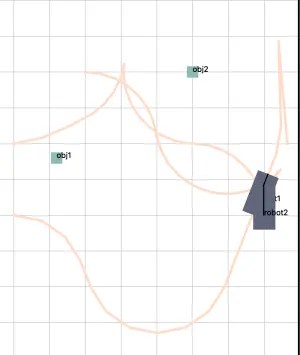
As the last try, I fed this prompt to Gemini 3 Pro:
Your suggestion made it to take longer.
This time, Gemini 3 Pro blamed its own way of doing collision checking and gave a modified version of the function it gave me in the previous answer.
The performance regression happened because the previous solution performed a computationally expensive collision check on every candidate path in the loop. Collision checking (checking overlaps with static/dynamic obstacles) is the most expensive operation in the planner.
The result? well, it did make its own suggestion better, but it still couldn’t make if more efficient than how it was before. I’d say Gemini 3 Pro couldn’t figure it out.

Grok 4.1 Answer
Unlike Gemini 3 Pro, Grok 4.1 focused on playing with parameter values related to analytic expansions. It isn’t a direction I would prefer the most, but I thought it might be an easy patch.
To significantly reduce the planning time when the goal is close to the boundary (without changing the correctness of the solution), increase the analytic_threshold dramatically (to 15–20 units or higher) so that the planner switches to Reeds-Shepp analytic expansion much earlier.
Why this happens
When the goal is close to the boundary, the discrete forward expansions (the bicycle-model arcs generated in the main A* loop) very frequently cross the boundary → the node is immediately rejected by is_in_bounds().
Because the vehicle has a non-zero size and the reference point is not perfectly centered, many steering angles / move distances that would otherwise be useful become invalid when you are within ~0.5–1 m of the wall.
The heuristic (Reeds-Shepp distance, which ignores bounds) keeps telling A* “you are almost there, keep expanding”, so A* desperately keeps generating thousands of these invalid successors near the wall before it finally finds a node from which a valid Reeds-Shepp connection exists.
This is the classic “funnaturally optimistic heuristic near hard constraints” problem.
One tendency in Grok 4.1 that I like is that it often returns with multiple options.
// Option 1 – fixed large value (recommended for your 5×5 m map)
params.analytic_threshold = 20.0;

// Option 2 – even larger (essentially always try RS when reasonable)
params.analytic_threshold = 50.0;

// Option 3 – dynamic (my personal favorite – costs almost nothing)
params.analytic_threshold = std::hypot(params.max_x - params.min_x, params.max_y - params.min_y) * 2.0;
Unfortunately, simply changing the parameter to any of the suggested values did not improve the performance for the specific instance.

Grok 4.1 also gave other suggested fixes, including dynamically changing the parameter value and bypassing expansions too close to the border, but none of them made the planning faster.
I think there are known techniques for such instances such as pre-computing costmap or reverse-expanding search, but as for the tests on the two LLMs, I’ll stop here for now.
While none of the LLMs practically found a valid solution to improve the speed, I would state that Grok 4.1 was slightly better than Gemini 3 Pro on this specific instance because it resulted in similar performance to what Gemini 3 Pro did with just one line of code change.
Additional Remark
While the two LLMs failed to find a way to improve the efficiency in finding the first path, they both actually achieved similar improvements in finding the next path for another robot, resulting in shorter total planning time.


Both LLMs actually reduced the total computation time to a very close level.
I believe this specific example was not suitable to demonstrate how the two suggested improvements are different, but clearly, I prefer either of the suggestions than the original despite they both take longer in finding the first path.
Conclusion
Gemini 3 Pro is impressive in finding the cause of error beyond the provided prompt. I prefer how Grok 4.1 finds a solution because it tends to provide a more compact solution, yet it seems like it requires a better pointer to the cause of the problem to fix. To this end, it is quite difficult to decisively conclude which is better than which. Although it takes triple the effort to use both LLMs and compare every time, I’ll probably do it until any definitive improvement comes out from either end.
On Gemini side, I can clearly see that it made a good improvement compared to the previous version. Nevertheless, it is still not at the stage that it can easily solve hard problems without user’s understanding of what it does and feedback to the model, so I’ll still be cautious with the answers it returns.
It is important to note this is just one example test that it may not reflect the capabilities of each LLM precisely enough. For this reason, I’ll try to add more real-application test cases to show more comprehensive comparisons of the two LLMs.